Controls on the strip
Gain and 48V appear on LV1's own channel strip. No window floating over the mixer.
Turn the gain in LV1 and the desk follows. Turn it on the desk and LV1 follows. Headlink only sends control data, so your audio path doesn't change.
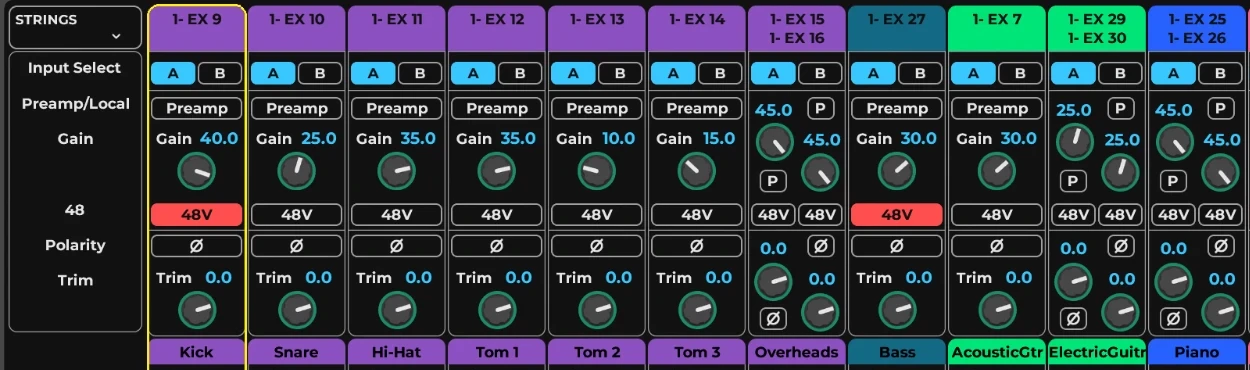
A vocal comes in hot mid-soundcheck. Today that's a walk, or a tablet you have to unlock and search. With Headlink it's the knob already in front of you.
The WSG card can't tell LV1 which preamp feeds which input. Headlink reads that from the WING and keeps reading it.
Gain and 48V appear on LV1's own channel strip. No window floating over the mixer.
Discovers your WING or X32/M32 on the network and reads its model and firmware. No IP to type.
Repatch on the desk mid-session and gain follows the new source; knobs appear and disappear on their own. No restart.
Preamp gain and 48V are stored in LV1’s scenes and sessions and come back on recall, the way Waves’ own preamp boxes do.
Local XLR and AES50 stageboxes have different ranges and steps. Each is read per channel.
Turn it in LV1 and the desk follows. Turn it on the desk and the strip follows, at the value the console actually applied.
Link a pair on the WING and both legs move together. LV1 reflects it: turn either side and both follow.
New versions arrive in the background, checked against Headlink’s signature, and take effect without closing LV1. What can’t change mid-session waits for the next time LV1 closes.
FOH and monitor desks on one network? Headlink drives only the one whose card is in this LV1. If it can’t tell, Setup asks once and remembers.
Audio stays on the SoundGrid card. Headlink only uses the network link to the desk, so if Headlink stops, the show keeps going.
The tray icon turns red and the strip's gain and 48V go inert. They never show a stale number. Audio is unaffected.
Since 2.0 Headlink doesn't depend on LV1's internals, so a new LV1 keeps working. If Headlink ever can't start, LV1 runs with the stock Waves module as before.
Headlink lives in its own bundle beside Waves’. Switch a console off and LV1 uses Waves’ stock module at once; remove Headlink and nothing of Waves’ was ever changed.
48V only goes to the channel that asked for it, and never moves when you link a pair or repatch. With Pro you can lock 48V off on ribbon inputs.
One small app, no drivers, nothing installed on the desk.
Windows: right-click the zip, choose Extract All, and run Headlink.exe; keep Headlink.exe, Headlink.dll and the modules folder together. Mac: open the DMG, drag Headlink to Applications and open it from there. Headlink searches your network and shows every console it finds.
Headlink installs into LV1 and switches on the consoles it found — Waves’ files are not touched. Each console switches off and on later, even while LV1 runs. Updating from Headlink 2? Setup offers the move once LV1 is closed.
In LV1: Setup › System Inventory. Gain and 48V appear on the strip.
Headlink-Core.zip · v3.2.0 · 872 KB · Windows 11
SHA-256 e29312153eecb56ac8c28a48fbd0735e9afbbdbf712a02eae807434ef72b4697
Headlink-Core-macos.dmg · v3.2.0 · 5.8 MB · macOS 12+
SHA-256 01d452073c0f7f99ab4cfd97a1ceadcd85a6b7c822a93f6f9a216e16c3069025

Core puts WING gain and 48V on the LV1 strip. It's free, and you can download it today. Pro is a later release that adds a dashboard to see and change the patch and watch input levels.
For engineers who just want the knob in front of them. Nothing extra to open.
Download Core, free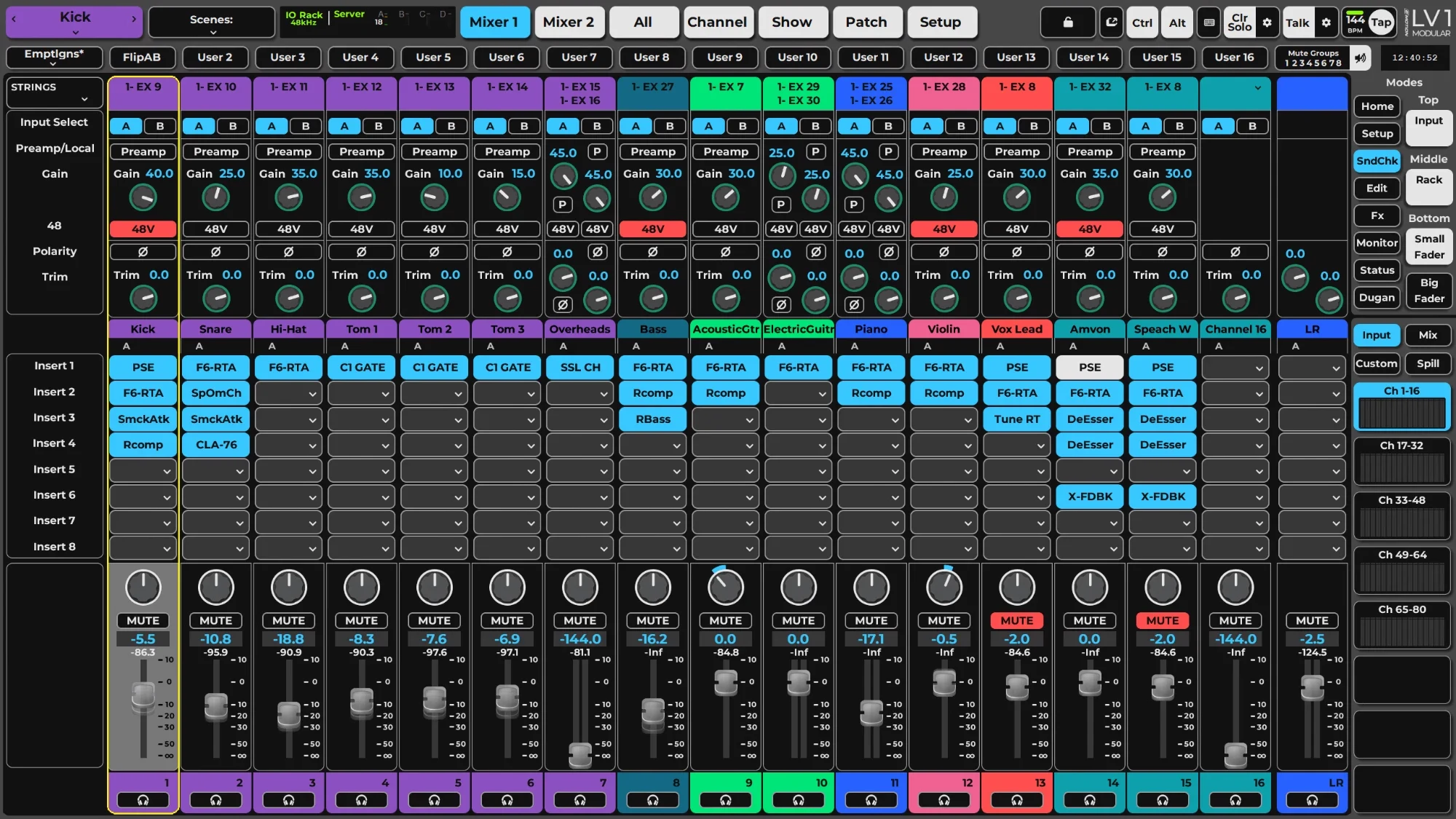
See and change which preamp feeds each input, and how hard it's running.

| Console | WING Rack tested. WING and WING Compact use the same protocol, not yet tested. X32 / M32 (beta): tested on an M32C and an X32 Rack with an X-WSG card; DN32-WSG card, full-size consoles and DL stageboxes not yet. |
|---|---|
| LV1 & computer | eMotion LV1 17.3 and 16.5 on Windows 11; LV1 17.3 on macOS 15 (Intel). Since 2.0 no LV1 version needs adding first. Windows 10, older macOS and Apple Silicon Macs untested. |
| Connection | WSG card (WING) or X-WSG / DN32-WSG card (X32/M32) for audio, plus a network link to the console. The console is found automatically. |
| Inputs | 64 channels. Local XLR and AES50 A tested. AES50 B, C and StageConnect are reported by the desk but untested. |
| On the desk | Nothing to install. Headlink runs on the LV1 computer. |
Repatch on the WING as you normally would. Headlink re-reads the patch and gain and 48V follow the new source straight away. With Pro you can also change the WSG patch from the dashboard.
Those two inputs are stereo-linked on the WING. When you link a pair, the desk sets the right leg to match the left and then moves both together, and Headlink shows that in LV1. If LV1 treats them as two mono channels, unlink them on the WING.
The tray icon turns red and gain and 48V go inert on the strip. Audio carries on over SoundGrid. When the desk comes back, Headlink reads the current state before sending anything.
It keeps working. Since 2.0 Headlink uses the module interface LV1 gives every I/O card, not LV1's internals, so a new LV1 build doesn't need adding first.
Every Headlink file is signed and timestamped, so Smart App Control lets it run. The first time you open Headlink.exe, SmartScreen may still say “unknown publisher”: choose More info › Run anyway. If Windows ever refuses a file, nothing is changed and LV1 runs on Waves' stock modules — Setup tells you.
Headlink for Mac isn’t notarised by Apple yet, so macOS asks once. Open Headlink from Applications and click Done, then go to System Settings › Privacy & Security, click Open Anyway and enter your password. Headlink’s menu-bar item has macOS Permissions…, which shows everything else macOS has to allow — Local Network for Headlink and for eMotion LV1 — and where to switch it on.
Headlink checks for a new version a minute after it starts and every six hours after that. Each file is checked against Headlink’s signature before it is used. New console modules go into the running LV1 straight away, without a restart; a new Headlink app or loader installs the next time LV1 is closed. Your audio is never interrupted.
Headlink drives only the console whose card is in this LV1: the one you chose in Setup, or the only one with a SoundGrid card fitted. If it can’t tell, it waits and Setup asks you once. Two consoles of the same type in one LV1 is coming to Pro; Core drives one of each type.
Behringer WING, and Behringer X32 / Midas M32 through an X-WSG or DN32-WSG card (beta).
Yes: scene recall and opening a session bring back each preamp’s gain and 48V. LV1 itself leaves out inputs patched to two LV1 channels and strips marked recall safe, exactly as it does with Waves’ own preamps.
"I built Headlink because I was tired of walking to my own WING Rack every time a channel needed gain. It runs on my rig today, all 64 channels, both directions."
Found a bug, or want to hear when Pro is ready? Email me and tell me about your rig. I answer every message myself.